Speaker-view-sync Example

Description

  • This is a sample plugin to send a message to/from the speaker view.
  • Although the plugin itself is meaningless, you can extend this plugin to implement a plugin that synchronizes data between the main window and the speaker view.
    • e.g. laser pointer like powerpoint
    • This plugin just sends “test” from a window to another.

Usage

  1. Add this plugin to the front matter of a .qmd file or _quarto.yaml, as shown below.

    revealjs-plugins:
      - speaker-view-sync
  2. Open the html rendered and the speaker view by pressing “S”

  3. Press “Ctrl” on a window

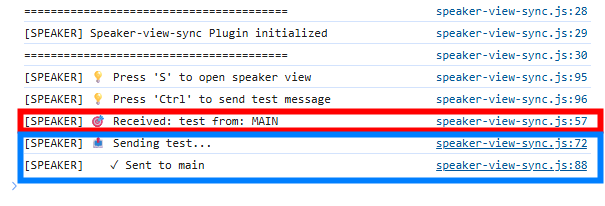
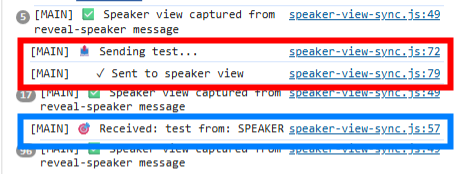
  4. The message will be displayed on a web browser console.

    • press “F12” to open it.

On SPEAKER

On MAIN

How to Change the Message to Send and Receive

You can modify the code here to change what data is sent/received and how they are done.

// Send a message by pressing the Ctrl key
document.addEventListener('keydown', (event) => {
  if (event.key === 'Control') {
    // Write your message to send here.
    const message = {
      namespace: 'reveal-sync',
      type: 'test',
      from: windowType,
      timestamp: Date.now()
    };
// Process a received message on reveal-sync
if (data && data.namespace === 'reveal-sync') {
  // Process your data received here
  // ...
  if (data.type == 'keepalive') {
    if (currentSlideWindow !== event.source) {
      currentSlideWindow = event.source;
    }
  } else {
    console.log(`[${windowType}] 🎯 Received:`, data.type, 'from:', data.from);
  }
}